
Migration
Email and complex sources → Microsoft 365
Exchange Server or a hybrid that has outgrown its design. Hosted Exchange. IMAP and older mail platforms. A Microsoft 365 tenant your web host set up years ago. On-premises file servers and network drives heading for SharePoint and OneDrive.
Different starting points, one destination — and what determines the work is not the mail. It is everything the old platform is still quietly doing that nobody has written down.
Where you are starting from
Five starting points, and what makes each one different is not the mailboxes.
- Exchange Server, or a hybrid that outgrew its design
- The hybrid was often meant to be temporary and has been load-bearing for years. What matters is which side is authoritative for identity, and what still routes through the on-premises transport.
- Hosted Exchange
- Someone else runs the platform. You have mailbox access but usually no control of what sits underneath, which changes what can be exported and how the cutover has to be sequenced.
- IMAP and older mail platforms
- Mail is portable; almost nothing else is. Calendars, contacts, public folders and shared access are the parts that do not come across on their own.
- A tenant your web host provisioned
- GoDaddy is the common one. The tenant is real and the licensing is real, but it is frequently federated to the provider — which means it cannot simply be taken over. Defederation is its own sequence, and it happens before anything else.
- On-premises file servers and network drives
- Folder structures and NTFS permissions have no exact equivalent in SharePoint and OneDrive, so the mapping is a decision per share. The sharing model that replaces a drive letter is also a change for the people using it.
What you receive
Five documents about the move, produced before it starts and yours to keep.
- Estate inventory
- What the old system is actually doing: mail flow, transport rules, connectors, relays, and everything sending as your domain that nobody remembers configuring.
- Dependency map
- The applications, devices and scripts that authenticate against the current platform or send mail through it.
- Identity plan
- What happens to on-premises Active Directory and to any federation, in what order — including a defederation sequence where the tenant is held by a provider.
- Migration plan
- The order the sources have to be handled in, a cutover window for each, and where the rollback point sits when a step cannot be taken back.
- Validation criteria
- What finished means for each source — including every system that was sending mail as your domain before the move.
Identity decides the sequence
Where there is on-premises Active Directory, the directory and the tenant are one identity system. Which side is authoritative after the move is a decision rather than a default, and what happens to the on-premises side afterwards is a second one.
Where the tenant is federated to a hosting provider, that comes first. Defederation changes how every user authenticates. It has a window, everyone signs in differently afterwards, and it cannot be done quietly in the background while other work continues.
What the old platform is still doing
The common overrun on this path is always the same shape. Something has been sending mail as your domain for years, and nobody owns it.
- The multifunction printer that scans to email
- The line-of-business application that sends invoices
- The monitoring system, and whatever alerts it sends
- A relay a former administrator configured so an old server could send mail
None of these are in a migration plan until discovery finds them, and each one stops working at the cutover if it was not. That is why discovery precedes the plan rather than running alongside it.
How the move is staged
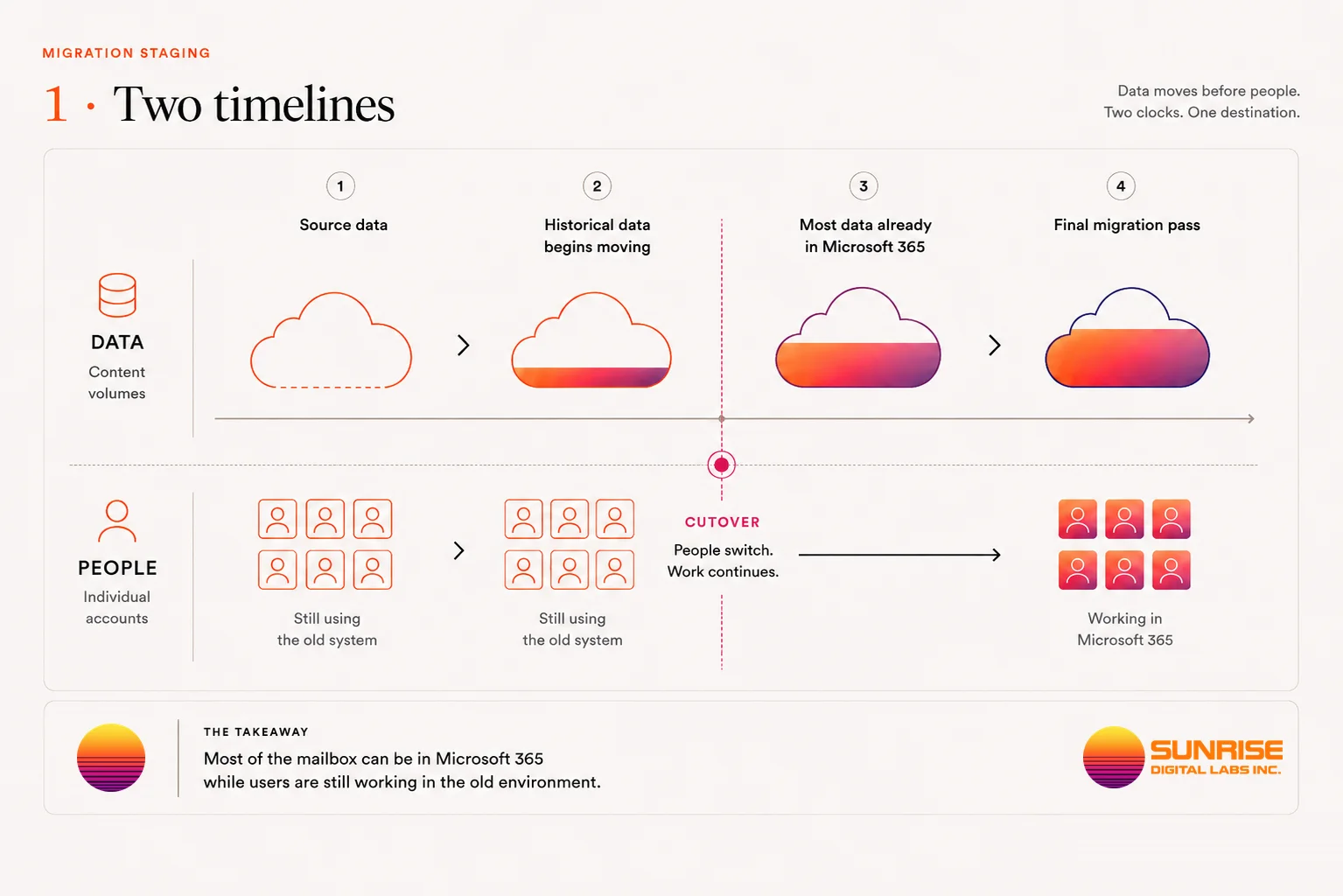
Moving a mailbox and moving a person are not necessarily the same event.
In a small environment it can be practical to move the mailboxes, change where new mail is delivered, and have everyone start working in Microsoft 365 in the same window. As the environment gets larger, that stops being something anyone can promise in advance.
A company may hold hundreds of gigabytes of historical mail, or terabytes. The connection has a limit. Both the source platform and Microsoft 365 restrict how quickly data can be read and written. Some mailboxes are far larger than the average. And the source system usually has to keep working while the migration runs.
That is why much of the data is often moved before the users themselves are cut over. So a migration has two related timelines.
- Data movement
- When historical information is copied into Microsoft 365.
- User cutover
- When Microsoft 365 becomes the system a person actually works from.
A migration design brings those two timelines together deliberately, rather than hoping both finish over the same weekend.
Three shapes a move can take
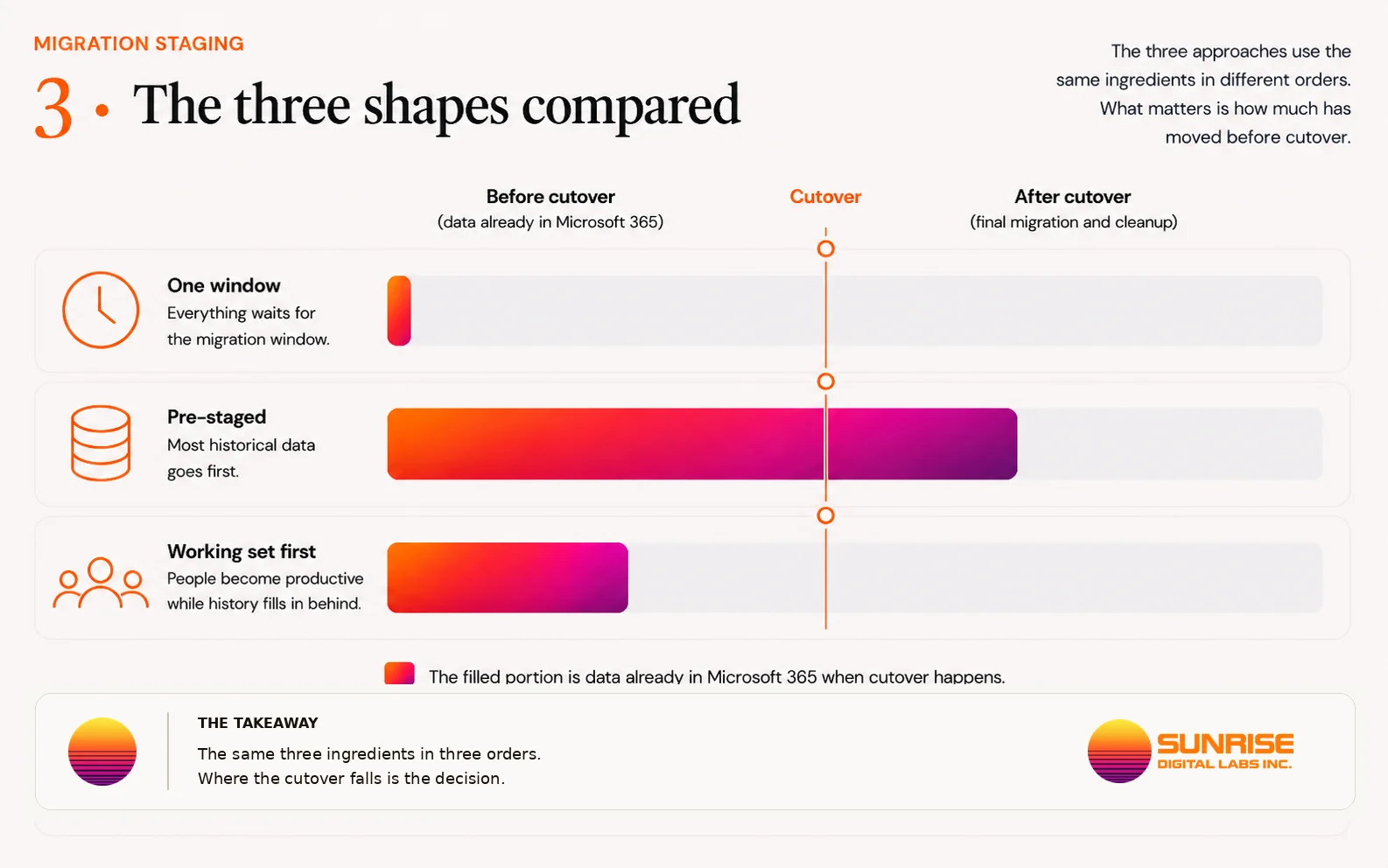
There is no single sequence that is correct for every estate. There are three, and what separates them is how much has already happened by the time anyone is asked to work somewhere new.
Everything moves in one window
The old environment keeps running until the migration window opens. Mail delivery is redirected to Microsoft 365, the mailbox contents move, and people start working in the new environment. The advantage is direct: there is very little time in which two environments have to be managed at once.
The trade is that a large amount of data has to move during the same period the business is waiting for the new environment to become usable. For a small, predictable estate that can be reasonable. For a large one, the window becomes dependent on variables nobody can guarantee in advance — mailbox sizes, source performance, available bandwidth, service throttling, problematic items, and failures that arrive for their own reasons.
So the question is not whether a one-window move is better or worse. It is whether the estate is small and predictable enough to make that concentration of work acceptable.
Move most of the data before cutover
This is the shape most people only expect once somebody explains it. People keep working in their existing mailboxes while older mail is copied into Microsoft 365 in advance. Nothing has been cut over. Mail still arrives where it always did.
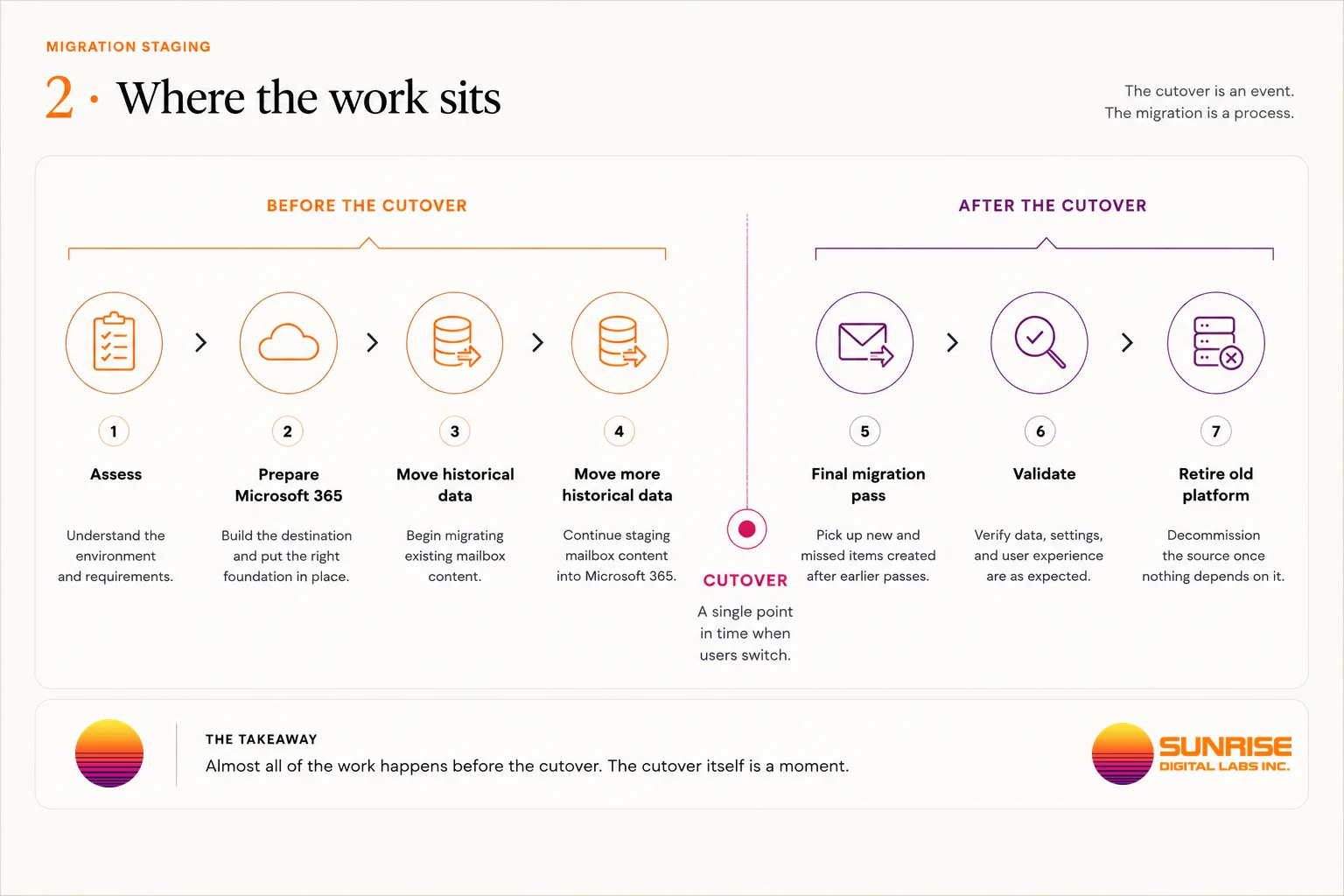
Behind that, much of the historical data is already sitting in Microsoft 365. When the cutover window arrives, the migration is not starting from zero. Mail delivery is redirected, people begin working in Microsoft 365, and a further pass picks up eligible material the earlier pass did not move.
This is what makes a relatively short cutover window possible on a much larger data set. The cutover is short because most of the heavy work happened before it — not because the data got smaller. That distinction is the honest version of the claim, and it is the reason the architecture is worth paying for rather than the window being worth promising.
Move the working set first
There is another option when getting people productive quickly matters more than having every historical item available on day one. Rather than moving years of history first, the migration prioritizes what people are most likely to need immediately — recent mail and current working data. People cut over with that portion available, and older material continues arriving behind them.
From a user's point of view Microsoft 365 becomes usable quickly, while the mailbox continues filling in for some time afterward. The trade is different rather than better. People are on the new system sooner; not all history is present at the start, and the source environment may need to stay available longer.
A final pass is not synchronization
Suppose data moved into Microsoft 365 on Monday, and somebody changes something in the source mailbox on Tuesday. It is natural to assume the final pass compares both mailboxes and makes Microsoft 365 match the source. That is not how migration passes generally work.
A later pass can find and move eligible items that were not migrated before, including material created since. It does not necessarily revisit everything it already copied and reproduce every change made to it afterward.
Take one message. It is copied to Microsoft 365 during staging. Its owner then files it into a different folder in the old mailbox. The migration already recorded that message as moved — so a later pass has no reason to look at it again, and the folder change stays behind. Deleting the original in the source does not mean the copy at the destination disappears either.
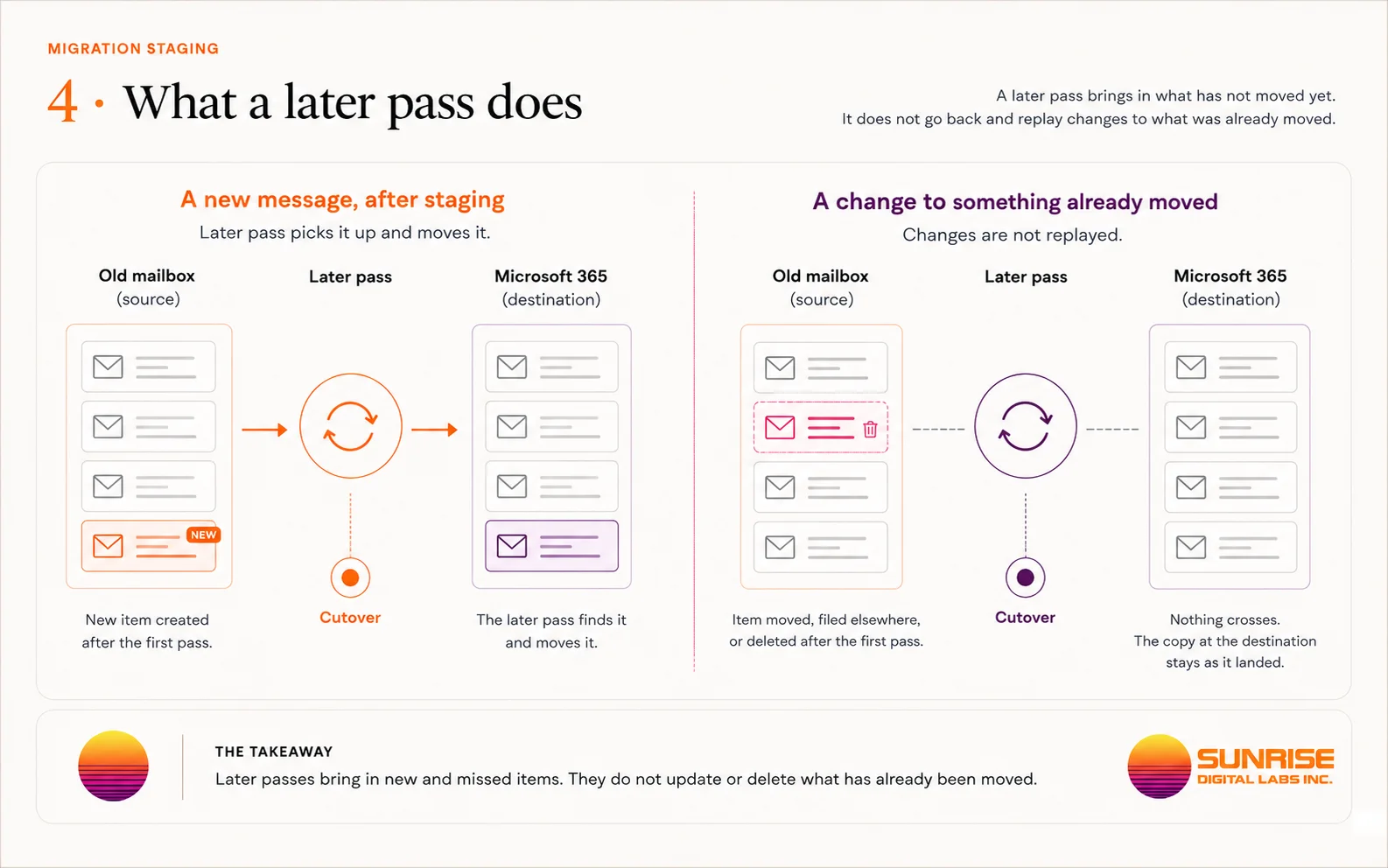
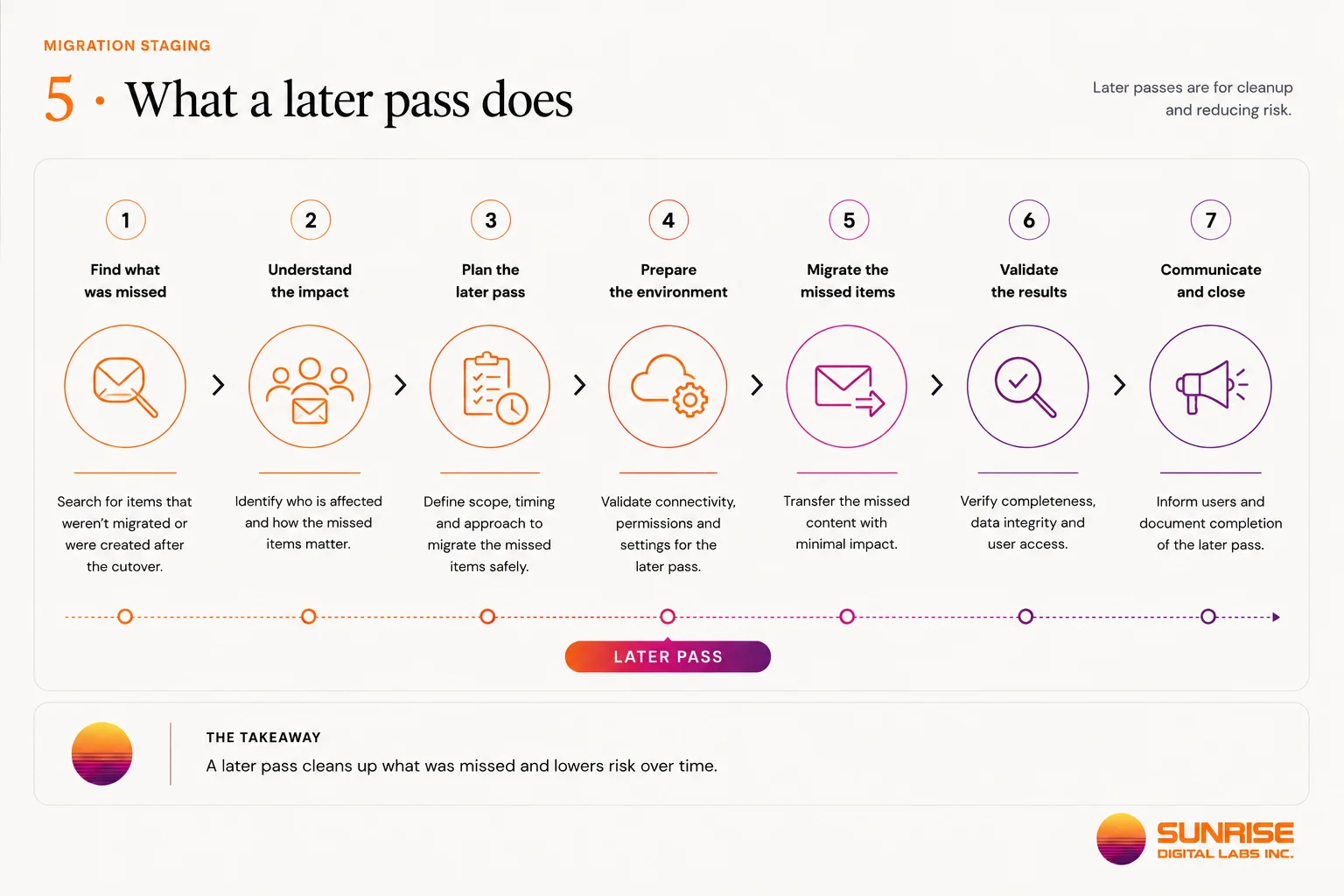
This is why staging strategy is a decision rather than a preference. The longer the gap between the first pass and the cutover, the more time there is for the two copies to drift apart. The design balances how much moves early against how far apart the two are allowed to get.
What coexistence actually means
Staging is about when data moves. Coexistence is about what has to keep working while both environments still matter. Related, not the same thing.
If everybody moves to Microsoft 365 at the same moment, coexistence can be very short. If people move by department, by office, by country, or in waves, the organization can spend days or weeks with colleagues working from different systems.
At that point the project acquires a second job. Moving data correctly is no longer enough. Mail sent to somebody has to reach the mailbox they are actually using. Replies have to come from the address people expect. Directory information may have to exist in both places. Calendars and availability may need to work across the boundary. Provisioning, account changes and support all have to account for two live environments instead of one.
That temporary operating state is coexistence.
Not all coexistence is equal
Coexistence is not one technology, and the difference between its levels is commercially significant.
Mail delivery coexistence
At the simpler end, coexistence solves delivery. The old system stays the initial delivery point, and mail for somebody who has already migrated is forwarded to an address that lands in their new mailbox. That allows some people to be on the destination while others are still on the source.
Forwarding alone is not the same as making both platforms operate as one messaging environment. BitTitan states it directly: forwarding can provide mail coexistence while not providing calendar free/busy coexistence.
Mail reaches the right person and both systems behave like one organization are two different outcomes.
Richer coexistence with Exchange hybrid
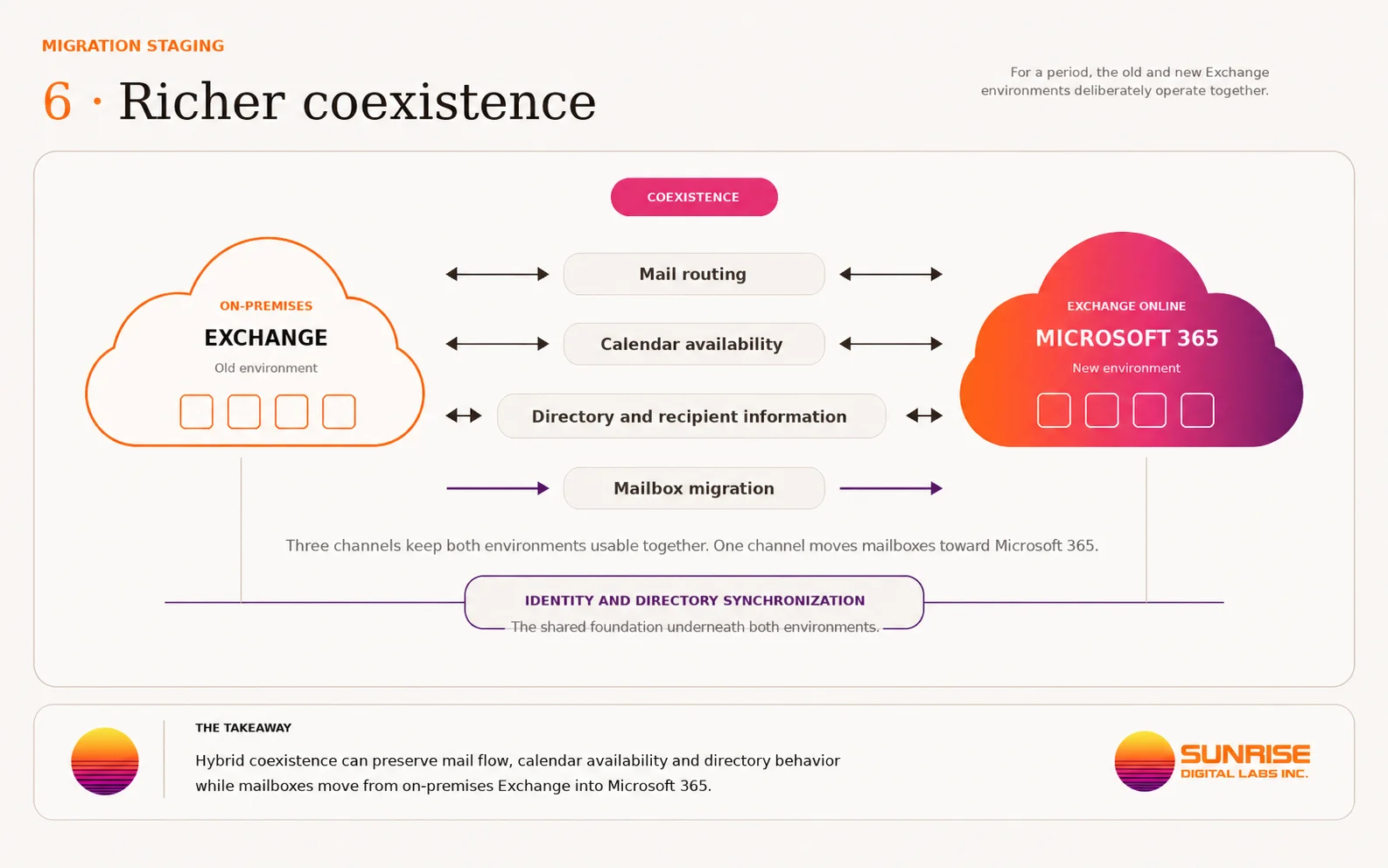
On-premises Exchange has another option. Microsoft supports a hybrid Exchange architecture built specifically so an on-premises Exchange organization and Exchange Online can operate together.
In a properly designed hybrid environment, coexistence covers considerably more than mail forwarding. Microsoft documents capabilities including secure mail routing between Exchange Server and Exchange Online, the same SMTP domain in use across both environments, a unified global address list, calendar free/busy sharing, mailbox moves between on-premises Exchange and Exchange Online, and other cross-premises Exchange functionality.
This is why an Exchange move is not well described as copying mailboxes. Some organizations need to move in waves while the people who have moved and the people who have not can still work together properly. Hybrid architecture can then become part of the migration design.
Microsoft's Hybrid Configuration Wizard configures the relationship between the two Exchange environments, and directory synchronization carries the mail-enabled object and identity information needed across them.
Hybrid is not mandatory, and not every Exchange migration needs it. The point is narrower: if the organization needs richer or longer-running coexistence, the migration architecture has to support it deliberately.
Keeping two systems alive has a cost
Coexistence reduces the pressure to move everyone at exactly the same moment. What it does not do is remove complexity.
For as long as coexistence runs, two environments have to be understood and supported. A new employee may have to be provisioned differently depending on which side they will live on. A mailbox change can affect routing. Directory changes need time to propagate between systems. A calendar problem may turn out to be a cross-system problem. Support staff need to know whether somebody has migrated before troubleshooting their mailbox. Security and access changes still have to behave predictably while the organization is split across two platforms. And the source system cannot simply be dismantled, because part of the migration may still depend on it.
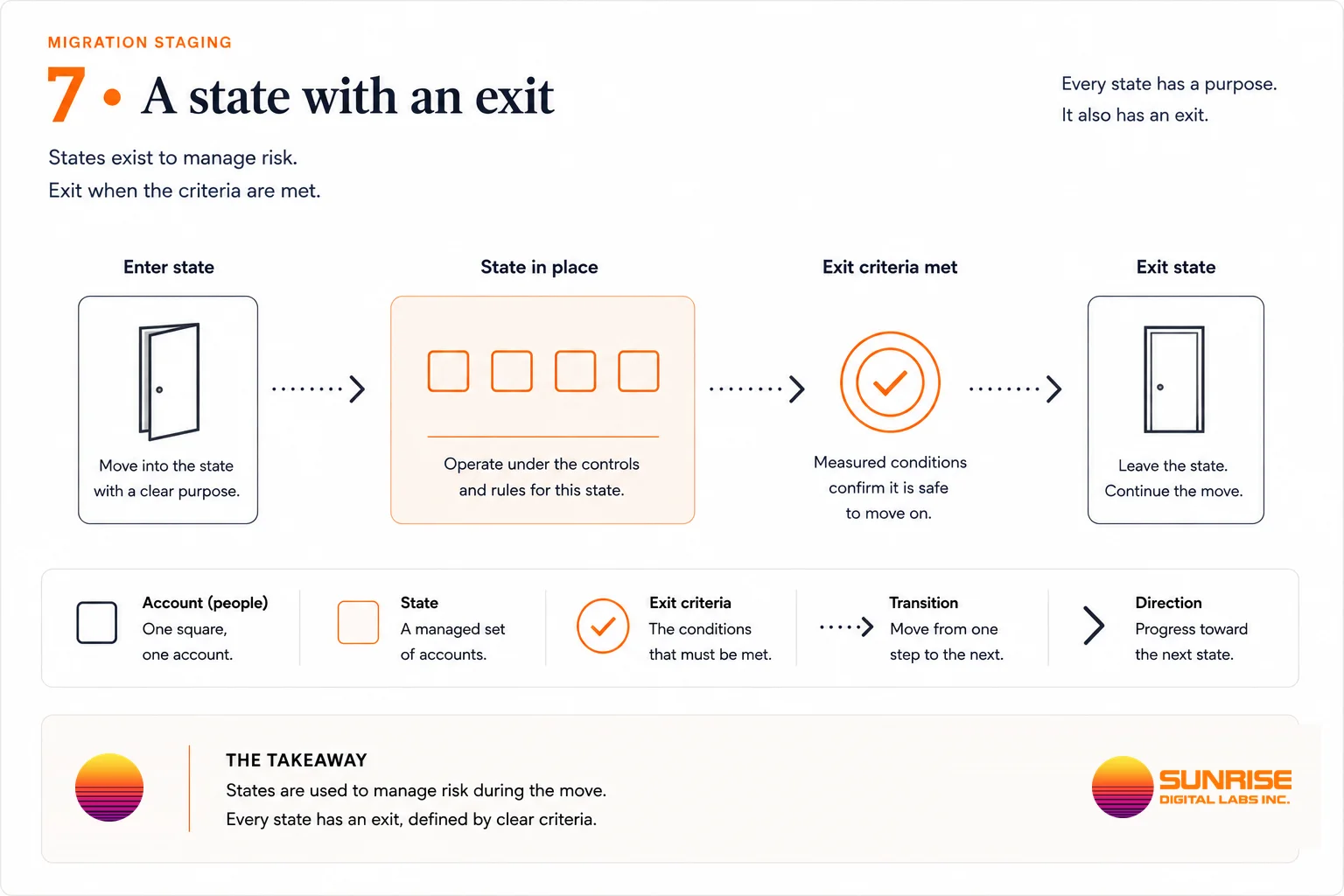
This is why a coexistence period is not chosen casually. Coexistence is worth having when it buys the project something specific — smaller waves, lower risk at each cutover, room to work around the business calendar, or enough time to move a large estate. Once it has bought that, keeping two systems alive is just keeping two systems alive.
The shape is an outcome of discovery
It is tempting to decide at the start that a migration will happen over a weekend, in three waves, or across a long coexistence period. That sequence should come out of the assessment instead.
What it depends on: how much data has to move and how it is distributed across people, the migration throughput actually available, what the source system can and cannot support, the identity model, dependencies between people, mail-flow requirements, calendar and directory requirements, business blackout periods, how long the source can stay available, and how much coexistence complexity the organization is willing to carry.
The result is not a migration date. It is a migration shape. That shape defines what can move early, what has to wait, where coexistence is needed, how people are grouped into waves, when mail flow changes, what the cutover window actually contains, and what has to be validated before the old environment can be retired.
That is the difference between a migration window that can be defended and one that was guessed.
How the shape gets decided — Migration Readiness Assessment · Moving between two Microsoft 365 tenants
Questions people ask before committing
What happens to our public folders?
They are handled separately from mailboxes, and where they move to depends on where they are now. Microsoft's documented public folder migration paths all start on-premises — from Exchange Server into Exchange Online or into Microsoft 365 Groups.
There is no documented tenant-to-tenant path, so a public folder estate already in Microsoft 365 is a question to answer during discovery rather than an assumption to carry into a plan. Permissions and folder rules do travel on the supported paths, and the rules stay public folder rules rather than becoming mailbox rules.
Can we move mail without moving the file server?
Yes. They are separate sources with separate destinations, and taking them in sequence is common.
What connects them is identity and habit — the same people, the same links inside documents — so the order is chosen deliberately rather than by which one feels easier to start.
Ours was set up through GoDaddy. Is that different?
Yes, and it is one of the five starting points this page names because it behaves unlike a directly-purchased tenant. The tenant is real Microsoft 365; what differs is who controls the subscription, the domain and the administrative access.
Establishing that control is the first piece of work, and it is a commercial step as much as a technical one.
Does the old system get switched off at the end?
On a decision, with a date — never automatically. On the public folder path in particular, a lock is placed on the source at finalization to make it inaccessible to users, and releasing it afterwards is not recommended because changes made there can no longer be synchronized.
That is worth knowing before the day rather than during it: the point at which the old system stops being available is a planned event with consequences, not a tidy-up afterwards.
What if some mail has to keep flowing to the old system?
That is coexistence, and it is a planned state rather than an accident — how it is arranged, what it can and cannot do, and what it costs while it runs are set out in how the move is staged.
Published by Microsoft: Public folders FAQ — supported migration scenarios
Find what is still running before you switch it off.
The mailboxes are the predictable part. What determines the cutover is the list of things nobody knew were still pointed at the old platform.